Windows desktop AI assistant

Jarvis AI AssistantYour desktop, smarter than ever.

Jarvis AI Assistant is a Windows desktop AI assistant for developers, ops engineers, and anyone who loses hours to routine computer work. It runs real tools on your own PC — shell, files, git, Docker, the browser, and optionally your Gmail and Google Calendar — so it finishes tasks instead of just talking about them. You bring your own AI keys, and your data stays on your machine.

Local-first
Voice latency
Warm boot
Telemetry only
AIOSJS

Jarvis is short for “Just A Rather Very Intelligent System

Microsoft Store ID: 9ND65V74RVTB

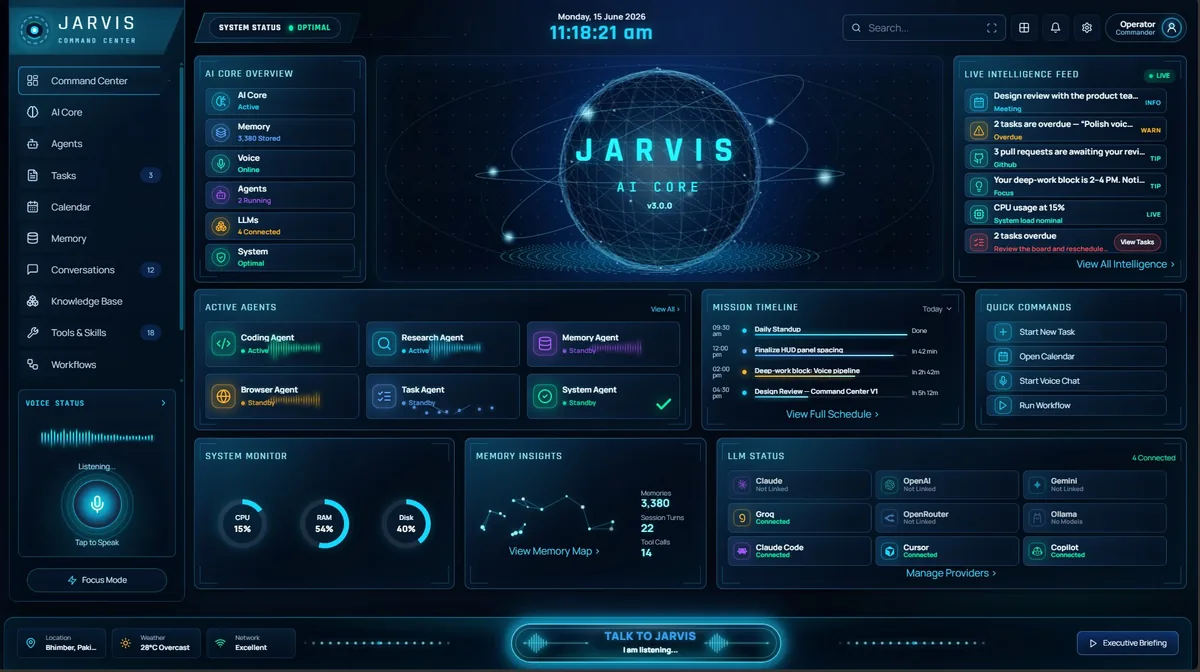
Jarvis AI Assistant command center dashboard running on Windows
Google Integration

Connect your Google account — only if you want to.

Jarvis AI Assistant works fully without Google. Connecting your Google account is optional, and you can use every other feature without it. When you do connect it, Jarvis can act on your email and calendar the same way it acts on the rest of your desktop — by actually doing the task, not just describing it.

Jarvis AI Assistant only accesses Google data after the user explicitly grants permission.

Users may disconnect Google access at any time. Revoke access in your Google Account, or disconnect inside the app.

Google Calendar

So you can ask for your day, and change it, in plain language.

  • View upcoming events

    To answer questions such as "what is on my calendar today?" and to include your schedule in a morning briefing.

  • See which calendars you have

    To list your calendars by name, so you can say which one an event belongs on instead of memorizing calendar IDs.

  • Create events

    So you can say "book a review with the team on Thursday at 3pm" and have the event actually appear.

  • Update events

    To move, rename, or reschedule an existing event when you ask — without you opening Calendar.

  • Delete events

    To cancel an event when you ask it to. This is the only reason delete access is requested.

  • Find free time

    To suggest when you are actually free. Free slots are worked out on your own machine from the events above — no separate availability data is collected.

Scopes requested

  • https://www.googleapis.com/auth/calendar.readonly
  • https://www.googleapis.com/auth/calendar.events
Gmail

So a reply you approve is actually sent, without leaving the assistant.

  • Send emails

    So a message or reply you approve is actually sent from your own address. Used only for messages you explicitly ask it to send.

  • Cannot read your mail through Google

    This permission allows sending only. It gives no ability to read, search, or list your Gmail — those features use IMAP with a password you create and control, not this Google permission.

  • Never permanently deletes mail

    The app cannot bypass your Trash or permanently delete messages, and deliberately does not request the broader Gmail scopes that would allow that.

Scopes requested

  • https://www.googleapis.com/auth/gmail.send

Nothing happens until you connect

Jarvis AI Assistant ships with Google disconnected. Access begins only when you complete Google's own sign-in screen and grant it.

Disconnect whenever you want

Disconnect inside the app to remove the stored token from your device, and revoke access entirely from your Google Account permissions page. Either way, access stops.

Your data stays on your machine

Google data is processed locally on your own PC. We do not run servers that receive, store, or process your Gmail or Calendar data.

Never used for ads or AI training

Google user data is never sold, never used for advertising, and never used to train generalized AI or machine-learning models — as required by the Google API Services User Data Policy.

Jarvis AI Assistant’s use and transfer of information received from Google APIs adheres to the Google API Services User Data Policy, including the Limited Use requirements. Read the full Privacy Policy for details on what is collected, how long it is kept, and how to delete it.

Visual Workflows

Understand Jarvis in three workflows.

From a simple command to a real desktop action, Jarvis makes every step visible: user intent, model routing, tool execution, privacy gates, approvals, memory, and mobile control.

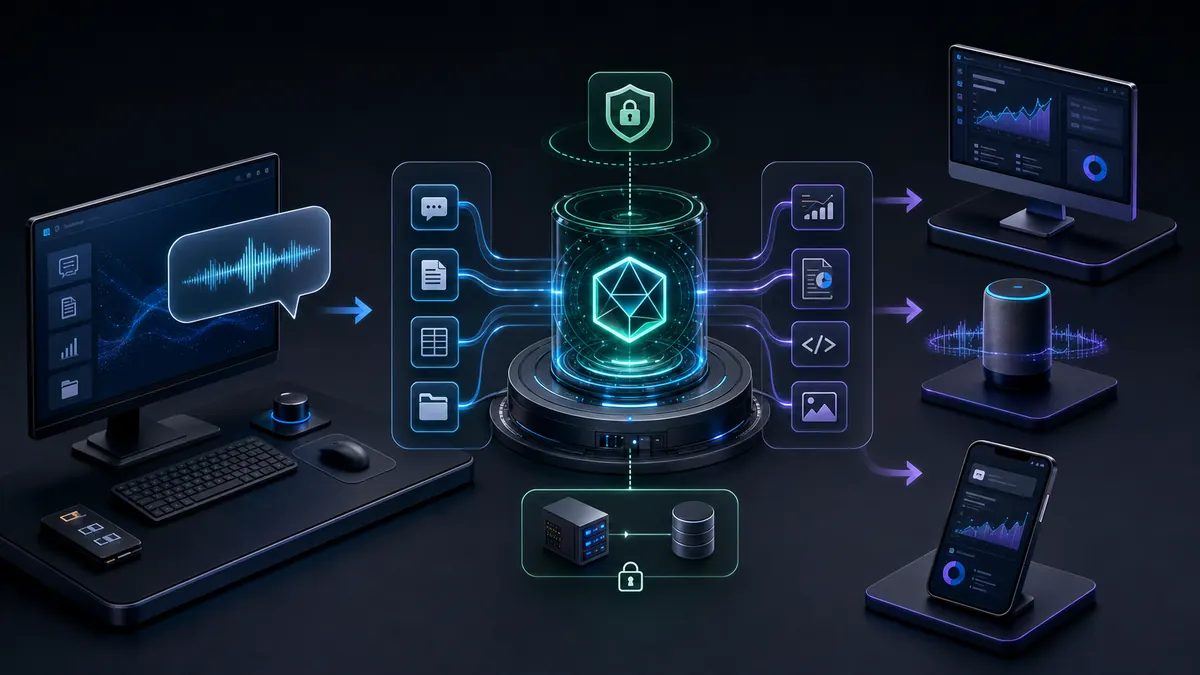
Premium workflow visual showing a user sending a command to Jarvis and receiving completed work across desktop, voice, and mobile surfaces.
For everyday users

Use Jarvis like a command center

Type, speak, or open the desktop app. Jarvis understands the request, chooses the right tools, streams progress, and returns the finished result in the same place you started.

Ask in plain language
Watch live progress
Approve risky actions
Get the completed result
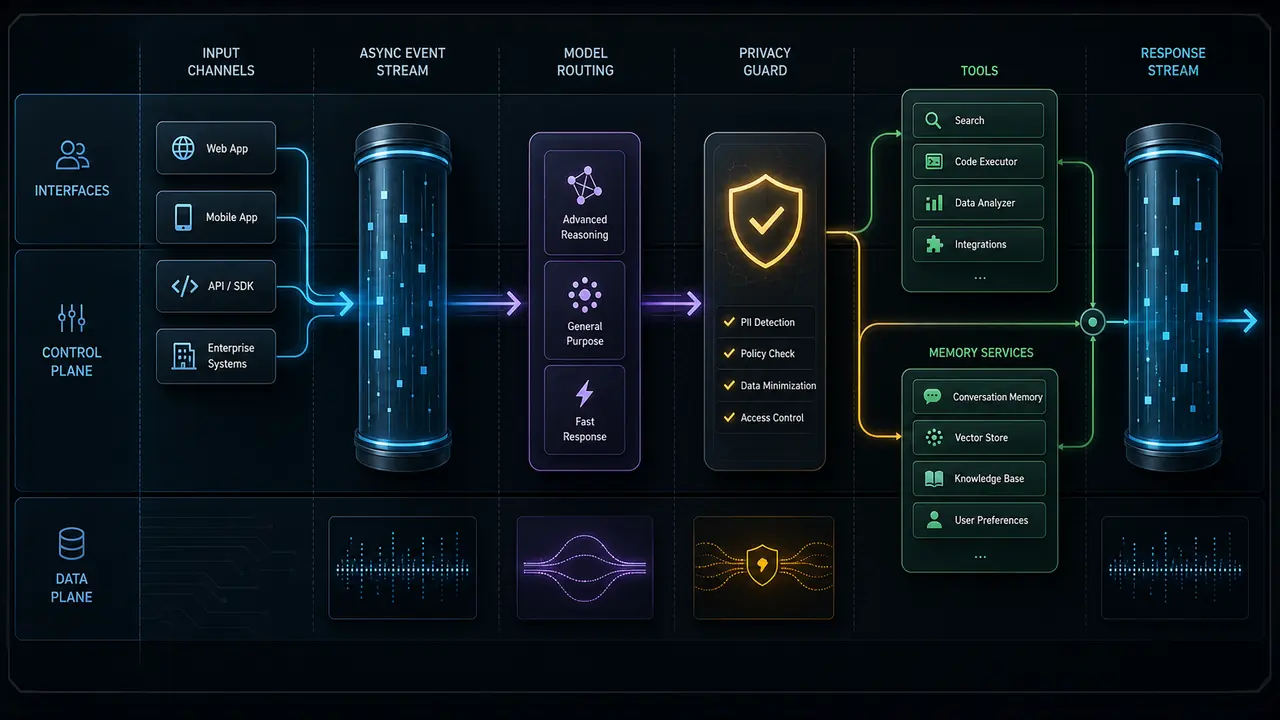
Technical pipeline visual showing interfaces, async event stream, model routing, privacy guard, tools, memory, and final response flow.
For technical teams

Engineered as an async agent pipeline

Every interface feeds the same FastAPI-backed AgentLoop. Model routing, privacy checks, tool selection, tool execution, memory, and responses are all streamed as typed events.

AgentLoop async generator
ModelRouter provider selection
ToolDispatcher smart subset
Postgres, Redis, and local fallback memory
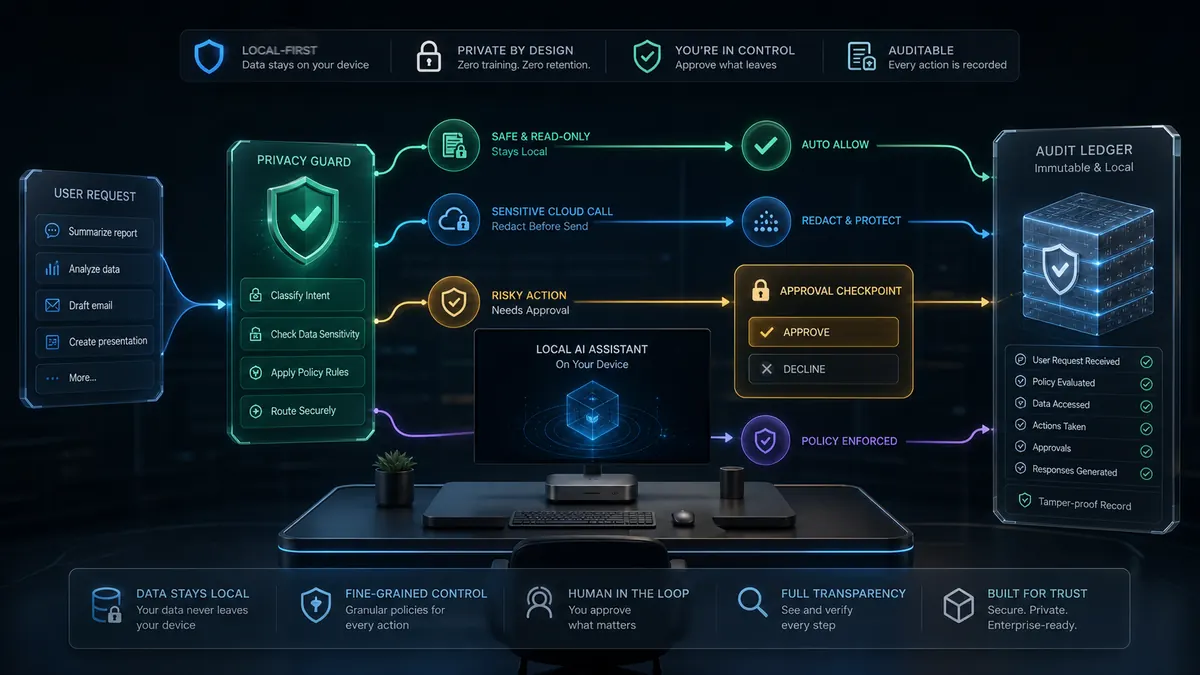
Security workflow visual showing local privacy guard, redaction, approval checkpoint, safe actions, and audit ledger.
For trust and security

Privacy and approvals before automation

STRICT mode keeps work local. GUARDED mode redacts sensitive data before cloud calls. Risky actions wait for approval and every external call can be audited.

Local-first by default
Secrets redacted before cloud
Approval gate for writes and sends
Audit trail for external calls
Mobile Control

Your phone is the remote. Your desktop is the engine.

The Flutter mobile app carries no AI brain of its own. It authenticates, connects to your PC through Tailscale, then sends chat, voice, terminal, and REST commands to the same desktop backend used by the web dashboard.

01

Login through the central HTTPS Auth API.

02

Connect the phone to your desktop over Tailscale.

03

Send chat, voice, terminal, or REST commands to the desktop backend.

04

Receive live events, notifications, and results back on the phone.

100%
Local-first
STRICT mode never leaves your machine
~1.2s
Voice latency
end-of-speech to first spoken audio
~7s
Warm boot
first launch 10–15s, then cached
Opt-in
Telemetry only
no ad tracking; crash diagnostics you control
0+
Live Tools
0+
Model Routes
0
Agent Loop
0
Privacy Modes
Core Capabilities

Not a chatbot.
An intelligence system.

Jarvis was built to handle real work at scale — hundreds of requests per session, parallel tool execution, and memory that grows smarter with every interaction.

INTELLIGENCE

Neural LLM Router

Prefix-based routing sends each query to the best model. Claude for reasoning, Gemini for vision, Groq for speed, Ollama for local privacy. Zero config switching.

claude-* → Anthropic · gpt-* → OpenAI · gemini* → Google
🔧
POWER

Agentic Tool Registry

75+ production tools: shell execution, filesystem ops, git control, Docker management, web search, Jira automation, WhatsApp/Messenger integration, and more.

Smart tool selection — only relevant tools sent per query
🛡
SECURITY

Privacy Guard Core

STRICT mode keeps data local. GUARDED mode redacts secrets before cloud. Fernet encryption at rest. Full audit trail of every external API call.

API keys, passwords, tokens auto-redacted
🧠
ARCHITECTURE

Think-Act-Observe Loop

The agent loop runs Think → ToolCall → Observe cycles with real-time streaming events. Budget tracking prevents infinite loops. Parallel tool execution via asyncio.gather().

ThinkingEvent → ToolCallEvent → ToolResultEvent → ResponseEvent
💾
MEMORY

Cross-Session Memory

PostgreSQL full-text search across all past conversations. Redis hot cache. Pattern learning tracks tool success rates, error→fix mappings, and your preferences over time.

Semantic recall · No context lost between sessions
🖥
INTERFACE

Every Interface, One Brain

Rich terminal CLI, FastAPI WebSocket API, Next.js dashboard, Electron desktop shell, voice, and Flutter mobile all share the same agent, tools, and memory.

CLI · Web dashboard · Desktop shell · Voice · Mobile
Full Capability Matrix

Everything Jarvis can do,
in one place.

Four pillars. Dozens of production capabilities. One unified agent that ties them together — with memory, privacy, and routing built in at the core.

Intelligence

  • Multi-LLM routing9 providers, prefix + auto selection
  • Vision & multimodalimage, screenshot, and document understanding
  • Streaming reasoningtoken-level Think → Act → Observe events
  • Smart tool selectiononly relevant tools sent — saves ~6.5k tokens
  • Cost & budget guardsper-session token + spend caps

Automation

  • Shell & filesystemsandboxed execution with approval gates
  • Git & GitHubcommits, PRs, issues, code review
  • Docker controlcontainers, images, logs via natural language
  • Jira & workflowtickets, boards, sprints automated
  • Browser automationnavigate, scrape, fill, screenshot

Memory

  • Cross-session recallPostgreSQL full-text + semantic search
  • Pattern learningtool success rates, error→fix mappings
  • Preference modelinglearns your style and defaults over time
  • Redis hot cachesub-millisecond context retrieval
  • Audit ledgerevery external call recorded and replayable

Experience

  • Voice (hands-free)wake-word → conversation → proactive idle
  • Native desktop appElectron + MSIX desktop shell
  • Command Centerdaily briefing, weather, notes, calendar
  • Web dashboardNext.js real-time streaming UI
  • Proactive nudgesJarvis surfaces what matters, unprompted
The Agent Loop

Watch it think.

Every request flows through a streaming Think → Act → Observe loop. Real events, real tool calls, real-time — not a single black-box response.

jarvis — event stream
🧠
THINK

Reason about the goal

The model plans an approach and decides which tools — if any — are needed.

ThinkingEvent
Plan: read git log → find TODOs → open ticket. Tools: git, jira.
Live Demo

Watch itthink.

One command. Multi-step agent reasoning. Real tool calls. Actual output. This is Jarvis working autonomously — not just autocompleting text.

User

jarvis "review my last 10 commits, find the biggest TODO, create a Jira ticket, and summarize what I did this week"

🧠
Thinking

Routing → claude-sonnet-4 · GUARDED privacy mode active · Selecting tools: git_tool, jira_tool, filesystem

Tool Callparallel

git_tool.log(limit=10, format="full") → parallel with filesystem.scan("src/")

Tool Result

10 commits parsed · 847 lines changed · 3 TODO markers found · biggest: "TODO: refactor auth middleware (security)"

Tool Callparallel

jira_tool.create_issue(project="JARVIS", type="Task", summary="Refactor auth middleware", priority="High")

Tool Result

Ticket JARVIS-47 created · assigned to Adrees · sprint: current · estimate: 3h

Jarvis

This week you shipped 10 commits across auth, API, and frontend. Key work: login flow rewrite (3 commits), tool registry optimization (4 commits), UI polish (3 commits). I've opened JARVIS-47 for the auth middleware refactor — highest priority item. Total: 847 lines changed, 0 regressions. Strong week.

🔀Multi-tool parallel execution via asyncio.gather()
🛡STRICT mode — no data left your machine
💾Full session saved to PostgreSQL memory
Routines & Scheduling

Tell it once.It runs on its own.

A routine is a job you hand to Jarvis once, and it does it again and again — on its own, on your schedule, with the same tools and the same model it uses when you talk to it.

  1. 01

    Describe it

    Write the steps the way you would say them to an assistant. No scripting, no tool names, no YAML.

    check my unread email and my calendar for today
  2. 02

    Say when

    Plain English schedules. "Every morning", "every day at 5pm", "every 2 hours" — or a one-off nudge.

    every day at 5pm → repeats daily
  3. 03

    Jarvis runs it

    Each step runs through the same agent loop as a live chat: real tools, real browser, real files.

    step 1/3 ✓ step 2/3 ✓ step 3/3 ✓
  4. 04

    It reports back

    Results land in your Command Center — or in WhatsApp, or your inbox, if that is what you asked for.

    "3 emails need a reply today. Here they are."

Four routines you can start with

These ship inside the app. Click one, read it, change a word — that is how most people learn what a step even is.

Morning briefing

Start the day knowing what needs your attention.

every morning
  1. 1check my unread email and my calendar for today
  2. 2pick out anything urgent or time-sensitive
  3. 3send me a short summary

End-of-day wrap-up

Close the loop before you log off.

every day at 5pm
  1. 1list what I finished today
  2. 2list anything still open
  3. 3draft tomorrow’s top three priorities and send them to me

Inbox triage

Stay on top of email without living in it.

every 2 hours
  1. 1check my unread email
  2. 2tell me only about messages that need a reply from me today

A simple reminder

No steps — just a nudge at a set time.

at 5pm

no steps — just a nudge

Built to be trusted with your mornings

A routine that fires at the wrong hour, or twelve times at once, is worse than no routine at all. So none of this is left to chance.

Your model, not ours

Routines run on whichever model you already chose for chat — Claude, GPT, Gemini, Groq, or a local Ollama model. Nothing is hard-coded and nothing is billed by us.

Your timezone

Schedules resolve against your machine’s local clock, not UTC. "9am" means 9am where you are, wherever that is.

Survives sleep

If your PC was off when a routine was due, it runs once when you come back — not a burst of every run you missed.

No database required

PostgreSQL is optional. Without it, routines persist to a local SQLite file in your home folder. Nothing to install, nothing to configure.

It waits for you

A routine will not cut into a conversation you are having. If you are mid-turn, it defers until you are idle.

Always under control

Pause, resume, run it now, reschedule, or delete — from the dashboard or by just asking. Every run is written to the audit trail.

Where to find it

Open Jarvis, go to Calendar, and you will find Routines at the top. Pick a starter routine or write your own steps. You can also just ask in chat — "every morning, check my email and summarise it" creates the same thing.

Architecture

Inside theneural loop.

Every request goes through a deterministic, auditable Think-Act-Observe cycle. No black boxes. Full visibility.

01

Query Received

Input arrives via CLI, Web UI, desktop shell, mobile, or voice — all converge on the same Agent Loop.

$ jarvis "analyze my git history and create a Jira ticket"
02

Neural Routing

ModelRouter maps your default (or prefix) to the best provider. PrivacyGuard redacts secrets before any cloud send.

claude-sonnet-4 → Anthropic API · GUARDED mode active
03

Tool Execution

Agent selects only the tools relevant to this query (saves ~6,500 tokens). Runs git_tool + jira_tool in parallel via asyncio.gather().

git_tool.log() ∥ jira_tool.create_issue() → ToolResultEvent
04

Memory & Response

Result saved to PostgreSQL with embeddings. Pattern recorded for future queries. Streamed response delivered in real-time.

memory.save() → stream.response() → done in 2.3s
Agent Loop — Real-time Event Stream
ThinkingEvent
ToolCallEvent
ResponseEvent
+ ToolResultEvent · ErrorEvent · streamed in real-time to all interfaces
System Architecture

Five layers. One intelligence.

Every request flows through a deterministic async pipeline — from interface down to persistent memory.

01

User Interfaces

Multiple surfaces connect to one agent loop: CLI, web, desktop shell, voice, and mobile.

$Rich CLI
APIFastAPI + WS
UINext.js Dashboard
DTElectron Shell
VOVoice Pipeline
MBFlutter Mobile
REQUEST STREAM
02

LLM Router

Routes each query to the optimal model. Privacy-enforced. Context-injected.

Claude
Anthropic
GPT-4o
OpenAI
Gemini
Google
Groq
Cloud
Ollama
Local
Claude Code
CLI
Cursor
IDE
Copilot
CLI
OpenRouter
Multi
CONTEXT INJECTION
03

Agent Brain

Think-Act-Observe loop. Plans, calls tools, synthesizes results in real-time.

THINK
ACT
OBSERVE

Real-time event stream

ThinkingEvent
ToolCallEvent
ToolResultEvent
ResponseEvent

+ ErrorEvent · StatusEvent · streamed
live to all connected interfaces

TOOL DISPATCH
04

Tool Registry

75+ tools spanning every domain — each typed, async, and safety-checked.

$Shell & Git
12
Browser
12
Jira / PM
8
Messaging
6
Computer Use
5
Web Search
4
Docker
7
Files & Code
10
RESULT SYNTHESIS
05

Memory & Services

Full-text search, semantic retrieval, hot cache, and persistent smart memory.

PostgresPRIMARY

Full-text search · Persistent store · tsvector indexing

Redis CacheCACHE

Hot cache · Sub-millisecond reads · TTL eviction

Smart Memory DBSMART

Semantic retrieval · Cross-session · Pattern learning

75+
Tools
9
LLM Providers
5
Arch Layers
<2ms
Model Routing

Async-first · Privacy-aware · Independently degradable · Zero data loss

Security & Privacy

Your data. Your machine. Your rules.

Jarvis is private by architecture, not by promise. Run fully local, redact before cloud, and audit every byte that ever leaves your device.

Three privacy modes

STRICT (fully local), GUARDED (redact-before-cloud), RELAXED. You choose per session — Jarvis never decides for you.

STRICT · GUARDED · RELAXED

Encryption at rest

Fernet-encrypted credential vault and memory store. Keys never committed, injected at build or runtime.

Fernet · AES-128

Full audit trail

Every external API call, tool execution, and secret access is logged to a replayable ledger you can inspect.

security_audit.db · traces.db

Automatic redaction

API keys, passwords, tokens, and PII are detected and masked before any data leaves your machine.

17-pattern redaction

Local model support

Run entirely offline with Ollama. No cloud, no data sharing, no account required.

Ollama · zero cloud

Auditable & inspectable

Every tool call, model request, and secret access is logged to a replayable trail. Read exactly what runs, when, and why — no black boxes.

Full audit trail
Privacy Guard

Your data.
Your control.
Always.

Most AI tools treat your data as their product. Jarvis is the opposite — a three-tier privacy system that lets you choose exactly how much (if anything) leaves your machine.

API keys & tokens auto-detected via regex patterns
Passwords & secrets stripped before any LLM call
Private keys blocked at the guard layer
All external calls audit-logged with timestamp
# Set in your .env
JARVIS_PRIVACY_MODE=STRICT
# STRICT | GUARDED | RELAXED
🔒
STRICTLocal-first. Zero cloud.

All processing stays on your machine. No data leaves your device. Ideal for sensitive projects, proprietary code, and regulated environments.

No cloud LLM callsOllama models onlyFernet encryption at restZero telemetry
RECOMMENDED
🛡
GUARDEDCloud-allowed with redaction.

Secrets, API keys, passwords, and PII are auto-detected and stripped before any cloud send. Full audit log of every external call.

Auto secret redactionAudit trail enabledCloud LLMs allowedPattern-based detection
RELAXEDMaximum performance.

Minimal gating for development and testing. All LLM providers available with no interception layer. Use only on trusted, non-sensitive workloads.

No interceptionAll providers availableDev/test use onlyMax throughput
Integrations

Every tool.One interface.

From LLM providers to DevOps to your Google account — Jarvis integrates everything into a single agentic command layer.

Claude

LLM
AI

OpenAI

LLM

Gemini

LLM
GQ

Groq

LLM

Ollama

LLM

OpenRouter

LLM

Gmail

Google

Google Calendar

Google

GitHub

DevTool

Docker

DevTool

Jira

Workflow

WhatsApp

Messaging

Messenger

Messaging

Tailscale

Network
+73more tools: shell, filesystem, git, web search, browser automation, and more
Four Interfaces

One brain.Every surface.

Switch between interfaces without losing context. The same agent, tools, and memory — whether you're at the terminal, browser, desktop, or talking out loud.

Rich Terminal CLI

$ jarvis

Fully interactive Rich REPL with syntax highlighting, streaming responses, and tool call visualization. The fastest way to run Jarvis.

🌐

Web Dashboard

$ jarvis --web

Next.js 14 dashboard at :3001. Full chat UI, project management, tool monitoring, settings panel, and real-time WebSocket streaming.

🖥

Desktop App

Microsoft Store
$ Microsoft Store → Install

Native Electron app — no terminal needed. Full Jarvis experience with auto-update, offline capability, and seamless system integration. Available for Windows 10 & 11.

🎙

Voice Interface

$ Desktop App → Settings → Voice

Hands-free voice mode via Whisper (STT) + Kokoro (TTS). Speak naturally, get spoken responses, control your entire system without touching the keyboard.

AVAILABLE ON
🪟Windows 10/11
🍎macOS 12+
🐧Linux (x64)
Use Cases

Built for those whobuild things.

Jarvis adapts to your domain. The same agent loop, tools, and memory — configured around your workflow.

Developer

Full-Stack Dev Automation

>
>
>
>
🖧
Ops Engineer

Infrastructure Intelligence

>
>
>
>
📊
Analyst

Research & Synthesis

>
>
>
>
Power Features

Features you won't find
anywhere else.

Beyond chat. Beyond autocomplete. Jarvis has capabilities built for professionals who need real automation — not demo-ware.

🖥

Native Desktop App

Install from the Microsoft Store and get the full Jarvis experience without a terminal. Auto-updates, offline capability, and deep system integration out of the box.

Microsoft Store → one-click install → auto-update
💬

Auto-Reply Engine

Automated intelligent replies for WhatsApp and Facebook Messenger. Set schedules, custom templates, and let Jarvis handle your messages autonomously.

WhatsApp · Messenger · custom rule engine

Parallel Tool Execution

Independent tools run simultaneously via asyncio.gather(). A query calling 3 tools runs in parallel, not series — typically 3× faster with zero extra configuration.

tool_a() ∥ tool_b() ∥ tool_c() → gather()
👤

Personalized Profile

Your role, projects, preferences, and custom instructions are injected into every LLM conversation. Jarvis knows who you are and adapts every response accordingly.

profile.json → injected in every prompt (60s cache)
🎙

Voice Command Mode

Hands-free operation with Whisper speech recognition and Kokoro TTS. Activate hands-free, hear spoken responses, control your entire system with natural language.

Whisper STT → agent loop → Kokoro TTS
🧬

Adaptive Pattern Memory

Jarvis records which tools work for which queries, maps errors to fixes, and learns your preferences across thousands of interactions. Gets smarter every session.

success_rate tracking · error→fix maps · preference weights

Built on a world-class stack

Enterprise-grade components, battle-tested libraries, zero bloat.

Python 3.11+FastAPIasyncioNext.js 14ElectronPostgreSQLRedisPydanticWhisperPyInstallerTailwindTypeScriptFernetpystray
View Full Guide
How It Compares

Not another chat box.

Most assistants talk. Jarvis executes — on your hardware, across your tools, with memory that lasts.

CapabilityGeneric ChatbotCloud CopilotJarvis
Runs natively on your desktop
Executes real tools (shell, git, docker)partial
Cross-session long-term memorypartial
Multi-LLM routing (9 providers)
Fully local / offline mode
Secret redaction before cloudpartial
Voice, CLI, Web & desktop — one brain
Auditable agent core (every action logged)
Quick Start

Install the apps.Start commanding.

No source build required. Jarvis is currently available through the official Windows app and Android app package.

01

Install Windows App

Get the official packaged Windows app from the Microsoft Store.

Open Microsoft Store
Search for Jarvis
Install the verified Windows app
Launch Jarvis from Start Menu
02

Install Android App

Use the Android APK or Google Play closed test to control your desktop from your phone.

Download the signed APK
Or join the Google Play test
Install Tailscale on phone and desktop
Sign in with your Jarvis account
03

Connect & Command

Connect mobile to your desktop backend, then use chat, voice, notifications, and desktop control.

Open Jarvis on Windows
Copy your Tailscale desktop IP
Paste it in the Android Connect screen
Start commanding your desktop

Official app distribution only

The public setup flow is Windows via Microsoft Store and Android via APK or Play testing. Source-code installation is not the current public install path.

Questions, Answered

Frequently asked.

Everything you need to know about running Jarvis — privacy, cost, models, and platforms.

Yes. Jarvis AI Assistant is currently free with no usage limits and no account required. You bring your own LLM API keys (or run fully local with Ollama), so you only pay your model providers directly — Jarvis adds no markup.

Only if you let it. In STRICT mode everything stays 100% local. In GUARDED mode, secrets and PII are redacted before anything is sent to a cloud model. Every external call is logged to an audit trail you can inspect.

Anthropic (Claude), OpenAI (GPT), Google (Gemini), Groq, Ollama for local models, and OpenRouter for 200+ more — all through one unified, prefix-based router. Switch models with zero config.

Jarvis AI Assistant ships as a native Windows desktop app (Microsoft Store / MSIX), plus a CLI, web dashboard, and voice interface. The agent core is cross-platform (Windows, macOS, Linux).

Jarvis AI Assistant is an agentic system, not a chat window. It runs 75+ real tools, remembers across sessions, routes between 9 model providers, and runs on your own hardware with privacy controls. It does work — it does not just talk about it.

Only so it can do the email and calendar tasks you ask for, and connecting is optional — Jarvis works fully without it. Calendar access lets it read your schedule, create, update, and delete events, and find free time. Gmail access is limited to sending: it can send a message or reply you approve, and nothing more. It deliberately does not request any permission that can read your mailbox through Google, because Google classifies those as restricted scopes. Reading and searching your mail is a separate, optional step that uses IMAP with an app password you create yourself and can revoke at any time — which also means it works with Outlook, iCloud, Fastmail and any other provider, not just Gmail. Jarvis AI Assistant only accesses Google data after you explicitly grant permission on Google's own consent screen, and you can disconnect at any time from inside the app or by revoking access in your Google Account permissions.

Yes. Every tool execution, model call, and secret access is written to a replayable audit trail you can inspect — no hidden black boxes around what runs or what happens to your data.

Yes. Free-Hand voice mode does wake-word → live conversation → proactive idle, with fast sub-second first audio using ElevenLabs (premium, opt-in) or local Faster-Whisper + Kokoro.

No. Talk to it in plain language from the desktop app or voice. Developers get a powerful CLI and tool registry; everyone else gets a Command Center with daily briefings, notes, and reminders.

Yes — they are called routines. You describe the steps in plain language ("check my unread email", "send me a short summary") and say when ("every morning", "every day at 5pm", "every 2 hours"). Jarvis then runs those steps on its own, using the same tools and the same model it uses when you chat with it. You can pause, resume, run it now, reschedule, or delete a routine at any time.

It catches up once. When Jarvis starts again it detects the missed schedule and runs the routine a single time, rather than firing every run you missed in a burst. Routine schedules also resolve against your machine’s local timezone, not UTC, so "9am" always means 9am where you are.

No. PostgreSQL is optional everywhere in Jarvis AI Assistant. If you have not connected one, routines and their run history persist to a local SQLite file in your home folder. There is nothing to install and nothing to configure.

SYSTEM READY · ALL MODULES ONLINE

Your AI. Your rules.
Your intelligence.

Just A Rather Very Intelligent System — built for professionals who refuse to be limited by generic AI tools. Install the official app. Own your data. Automate real desktop work.

Python 3.11+FastAPINext.js 14ElectronPostgreSQLRedisWhisperPyInstaller